
Part V, The dashboard
25The dashboard, view by view
The engine serves its own web page at /dashboard/, and the standalone proxy serves the same page at :8080/dashboard/. It answers what a log cannot answer at a glance: what the engine is doing right now, for whom, and how fast. It is written in TypeScript with Lit components, its charts are hand-drawn SVG, it loads nothing from a CDN, and the server serves it from dashboard/dist/ with no Node on the machine that serves it. The parts every view loads are about 45 KB of gzip. Figure 25.1 shows the seven views and what each reads.
25.1 Performance: the live panel
The Performance view has two pages. Engine shows the engine’s own requests; Parallel shows every request on every backend (Section 27.1).
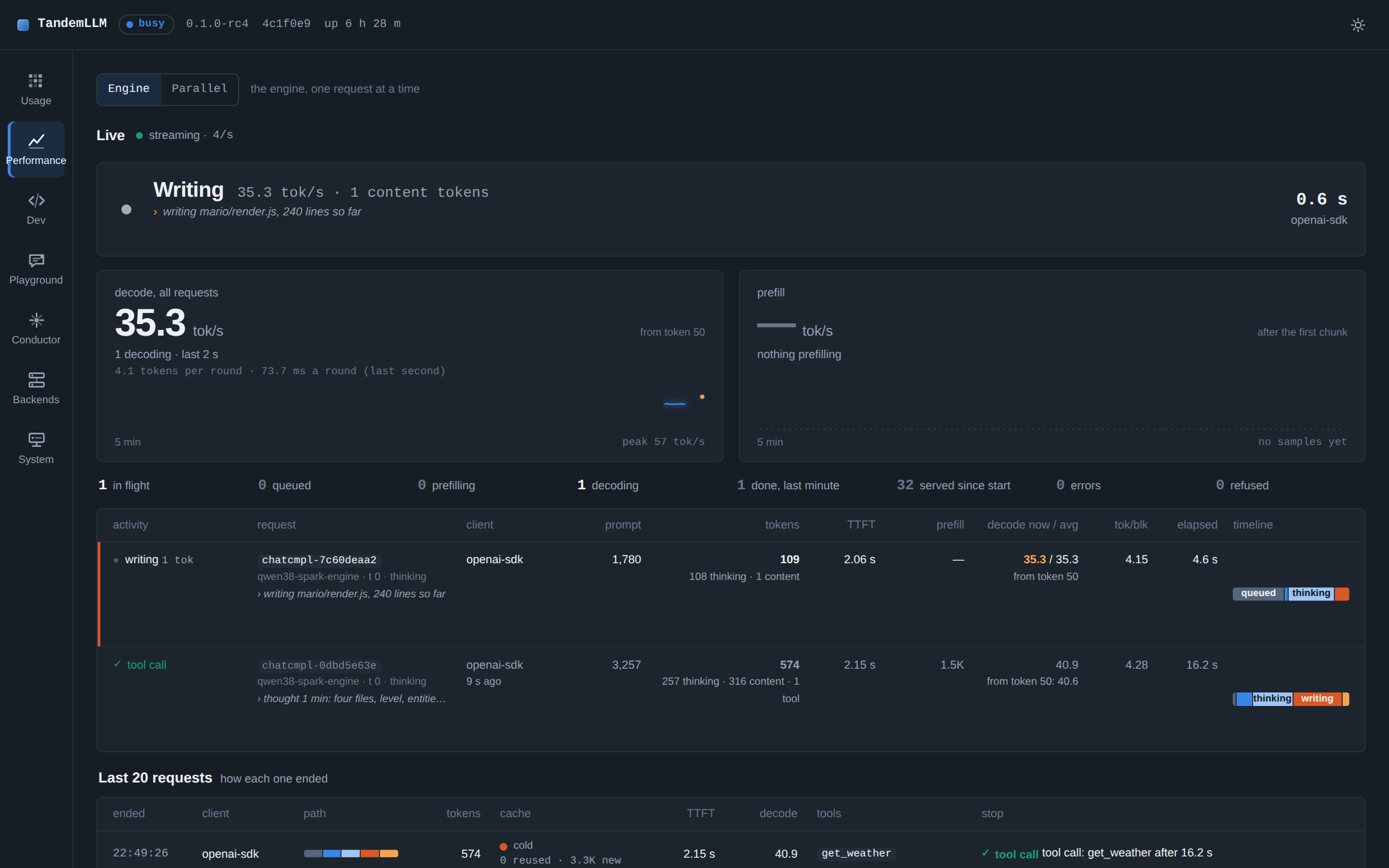
npm run preview:mock), not a measurement.The Live panel on top streams GET /v1/dashboard/live over server-sent events: four events a second while a request runs, one otherwise. A line at the top says what the engine is doing now, in the server’s own words:
Prefilling 36,864 of 48,210 (76 %), with the prefill rate and the time left;- “Thinking” or “Writing”, with the decode rate and the tokens so far;
- “Calling tool write_file”, with the size of the arguments written so far;
- “Waiting for client: running tool bash”, between two turns of an agent;
- “Idle” or “Draining”.
When the client’s socket closes while the engine still works for it, the line says so in red: “client disconnected 12 s ago”. Under the two big figures (decode and prefill tok/s, each with a 5-minute sparkline) the panel shows tokens per round and milliseconds per round over the last second. Each request in flight gets a row: its state, its client, tokens split into thinking and content, time to first token, the rates, the newest status line, and a timeline strip with one segment per state. When an agent sends its next turn, the row says which request it continues and what the client did in between (“continues chatcmpl-7f3a after 8.4 s, client ran bash”).
The live rates leave each request’s warm-up out (the first 50 decode tokens and the first prefill chunk) and show a dash when nothing runs, so a figure is always a rate of work being done now. A list of the last 20 requests says how each one ended in one sentence (“abandoned by the client after 73 s of silent prefill, 0 tokens sent”); abandoned, failed, timed-out and cancelled requests get a red mark, refused and rejected ones an amber one. The panel also reports on its own stream (“streaming · 4/s”, “no update for 3.0 s”, “reconnecting since 4 s”), so a silent page is never mistaken for an idle engine.
Every state and every sentence comes from the server (server/activity.py); the page only formats numbers. The engine’s loop keeps the state it needs anyway, and a sampler reads it once per tick, so no statement runs per token for the dashboard’s sake. A tick costs 410 to 470 µ s of CPU at 4 Hz (measured), and with the activity on and a stream open, the release gate found the text byte-identical and the round time unchanged within noise. --live-activity off turns the activity fields off.
25.2 Performance: the history
Below the Live panel: the time to first token, tokens per round and acceptance over the last 5 minutes, then speed history from the usage ledger. The Recent requests chart plots decode tok/s against prompt length, one dot per request. A replay (a response-cache hit, a summary written ahead) decoded nothing and is never a dot there, nor in any average, percentile or live rate; a switch lists the replays with their time to first token. Side-lane requests are not plotted either, because a short plain decode beside a turn says nothing about the engine’s decode rate. The y axis ends at twice the 95th percentile, and a point above it is a triangle at the top edge with its value in the tooltip. Each request’s cache source (end, resident, disk, spill, continuation and the others) is shown with it, so a slow first token can be read at once.
25.3 Usage
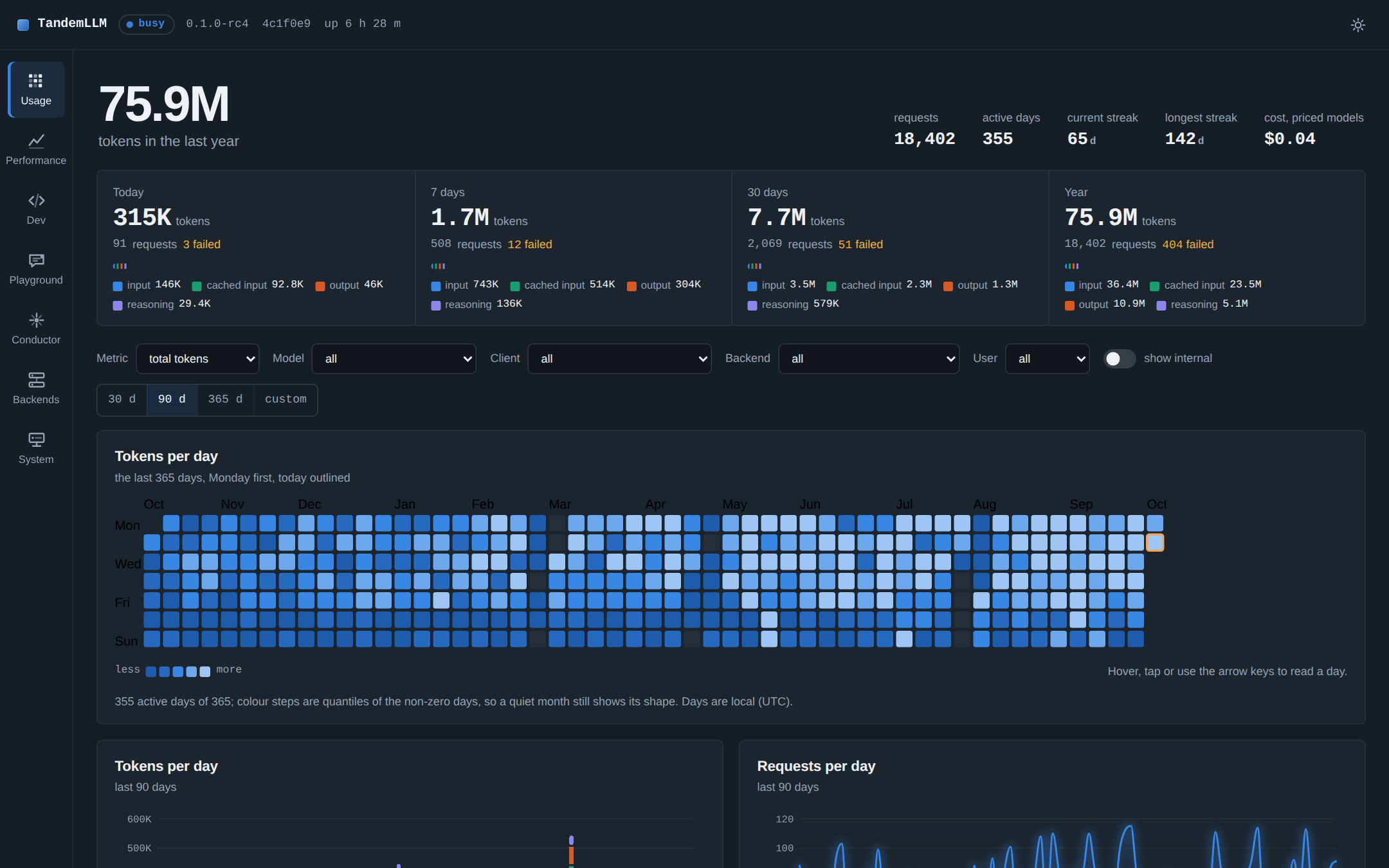
A year of tokens as a heatmap, with totals for today, 7 days, 30 days and the year, split four ways: input, cached input, output, reasoning. Filters by model, client, backend (engine is the engine’s own rows) and user, and the cost of priced models. The view reads the usage ledger, which keeps at least 400 days and never stores prompt or answer text (Section 31.2). TandemLLM’s own calls to itself (the router’s question to the engine, client kind internal) are left out of the totals, the filters and Dev’s recent requests unless the “show internal” switch is on; each names the request it served. In the Live panel the cached tokens never read above the client’s prompt, and TandemLLM’s notes show as their own figure, “+5,235 hidden”.
npm run preview:mock), not a measurement.25.4 Dev
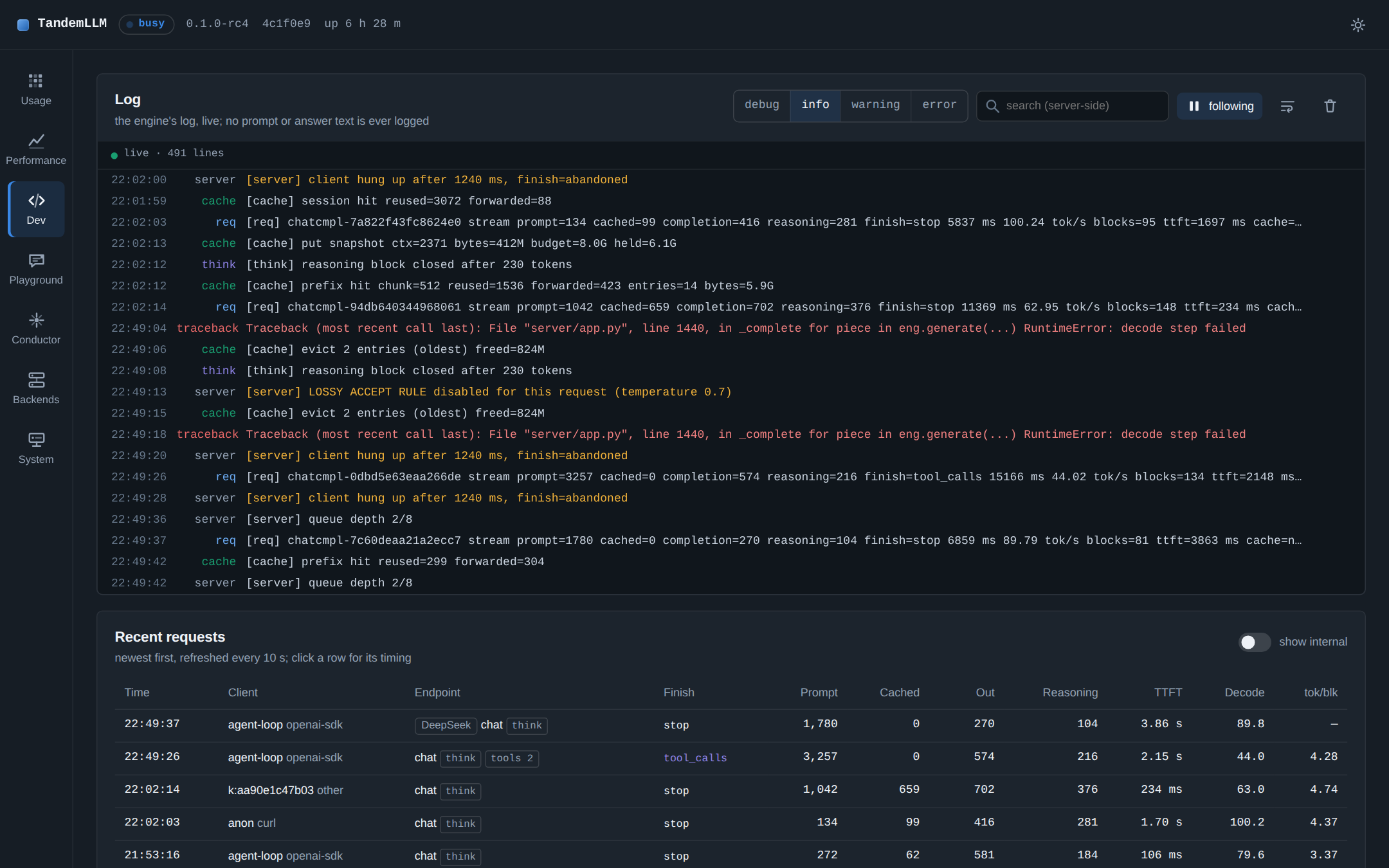
The live server log, filterable, with a detail view for each request: its timings, its cache source, its tokens, the conductor’s decisions for it and the reason it ended. A memory-gate refusal is an error line here with the allocated and reserved figures.
npm run preview:mock), not a measurement.25.5 Playground
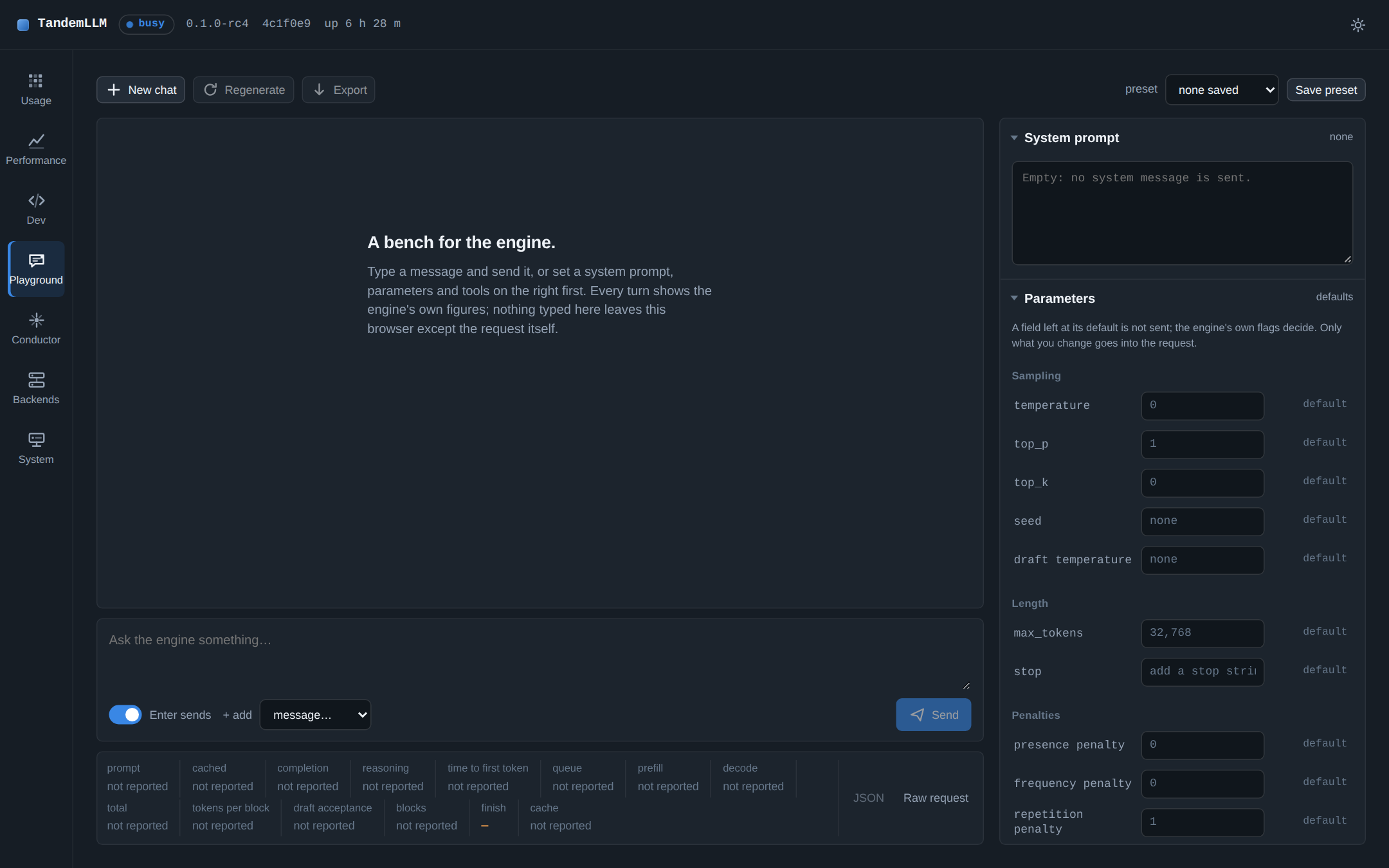
A streaming chat against the server’s own OpenAI API, with tools and parameters, and the figures of each answer. It uses the same routes any client uses, so it works with the login on or off.
npm run preview:mock), not a measurement.25.6 Conductor
The Conductor view shows how TandemLLM decides, and edits every knob of it. Every edit is checked first, shows its diff, and becomes a new version with a note; nothing asks for a password. Its screens:
| screen | what it shows and edits |
|---|---|
| Overview | the live decision feed: each turn’s class, confidence, effort, note and the monitor’s events; tiles over the last 24 hours |
| Routing | the task classes and their policy (effort, effort by size, packages, rules), the classifier stages and thresholds, stickiness and the structural rules, a test box that classifies a text you type |
| Monitor | the session monitor’s journal and rules: the tool checks’ floors and project rules, the reasoning arms, the empty-turn nudges, the session tasks with their texts and patterns, and what they hold per session right now |
| Profiles | each profile’s switches (mode, decisions, tasks and caps, thinking, what the user sees, outcomes, library, memory, shadow), the roles with their contracts, and the residency plan |
| Packages | every package, task skill, test skill, card and library skill, with tokens against limits and recent use; the editor; the Library tab; the Proposals tab |
| Deciders | the decision models: state, limits, latency, load and unload through the residency planner, the questions each answers, Laya for scripts |
| Sessions | the sessions, each a timeline of its turns and every hidden text the model saw, with an export |
| Memory | three tabs: the session transcripts kept on the machine, the memory notes (Chapter 23), and the disk tier’s state and settings |
| Compare | the shadow precision of each task and question, per backend, from the labels a person gave decisions, and the evaluation reports |
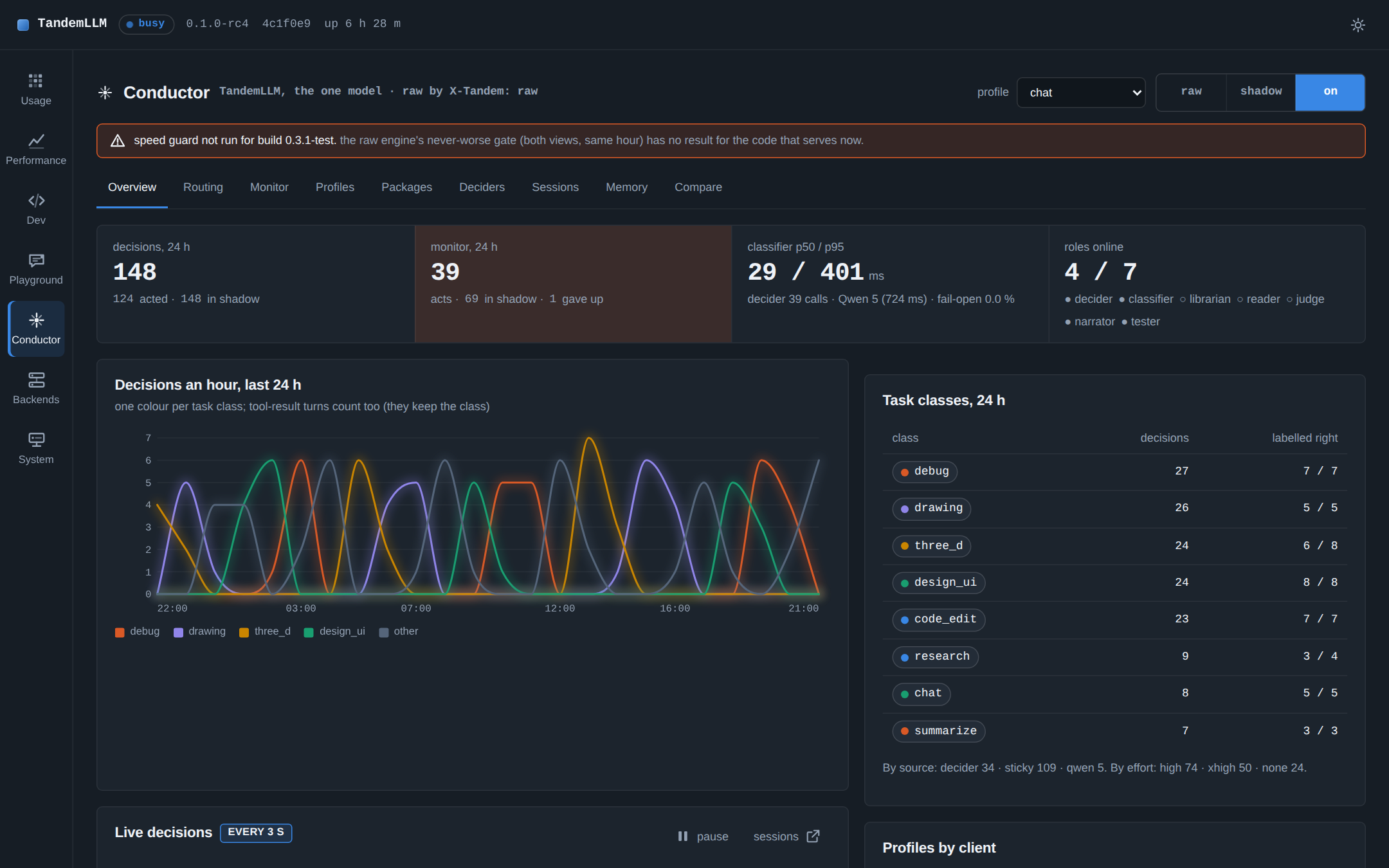
npm run preview:mock), not a measurement.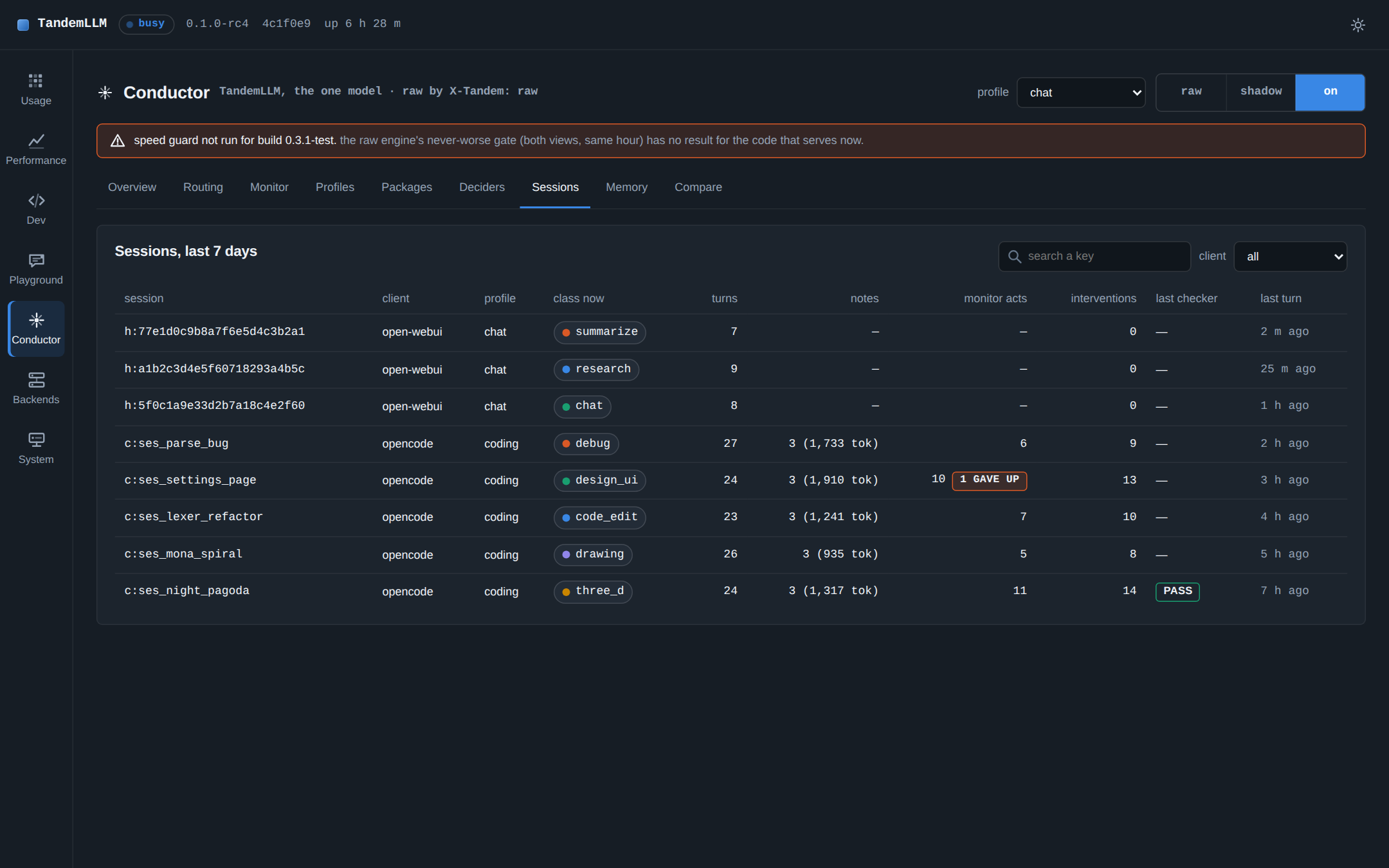
npm run preview:mock), not a measurement.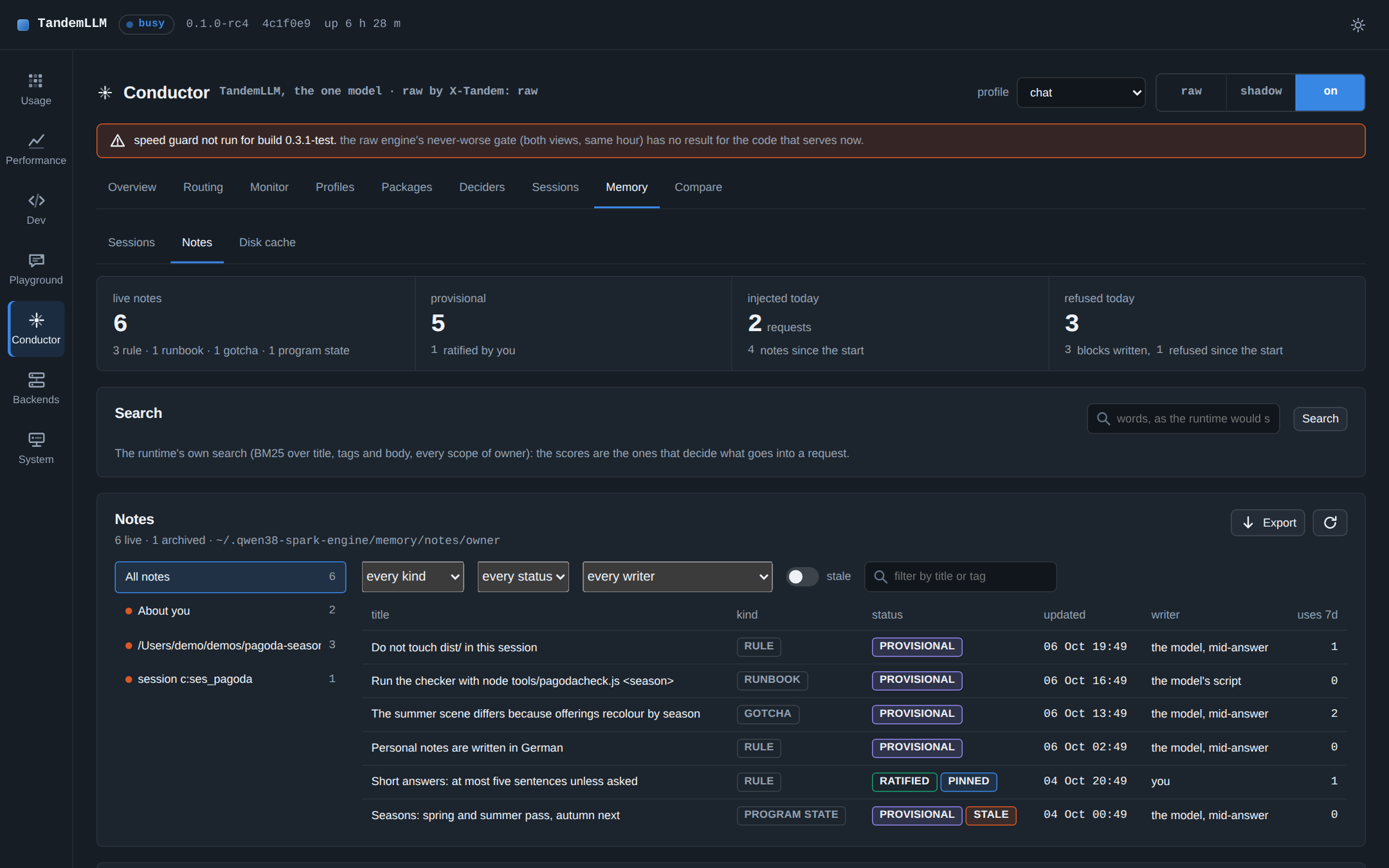
npm run preview:mock), not a measurement.25.7 Backends
On an engine without --backends the System answer says proxy.mode: off, and the view says the proxy is off without asking the configuration routes. The dashboard has no token dialog and no sign-in screen (Section 3.8).
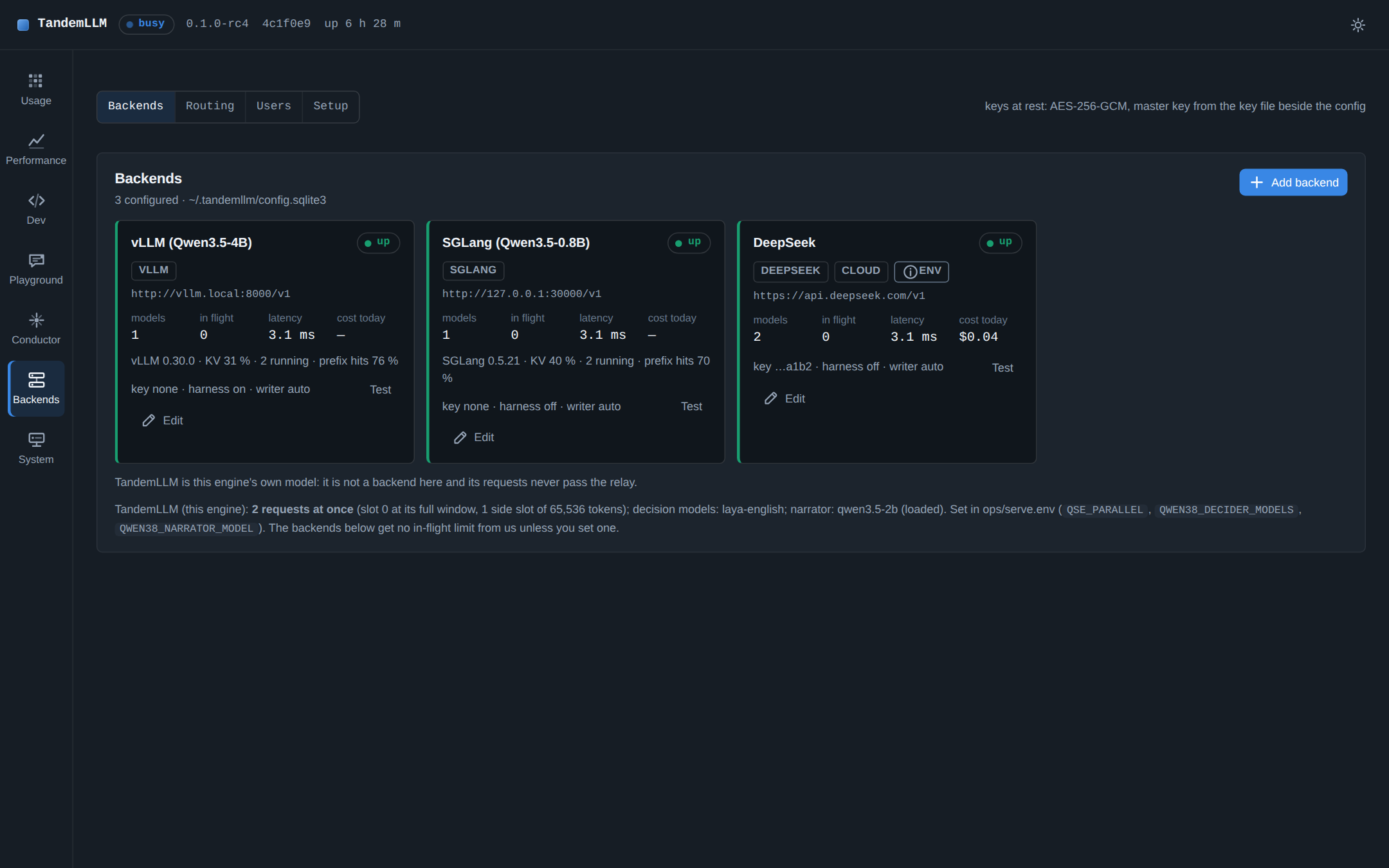
npm run preview:mock), not a measurement.The proxy’s registry: each backend’s health, models, requests in flight and cost today. Add one after a test connection, edit, delete. The key field is write-only and shows the key’s last 4 characters; a field a TANDEM_* variable sets is locked and names it. The models have public ids, prices (USD per million tokens, the release’s list prices one click away) and the conductor’s feature switches, each with what it resolves to and what it costs on that backend. The background memory writer’s switches are on a backend’s form. The ordered routing rules and the users with their keys, each key shown once, complete it. With no backend the page opens on Setup; on an engine without --backends it says how to turn the proxy on. A vLLM or SGLang backend’s card shows its engine’s own figures and whether its plugin reports (“L2 plugin” or “L1 only”, Chapter 27).
25.8 System
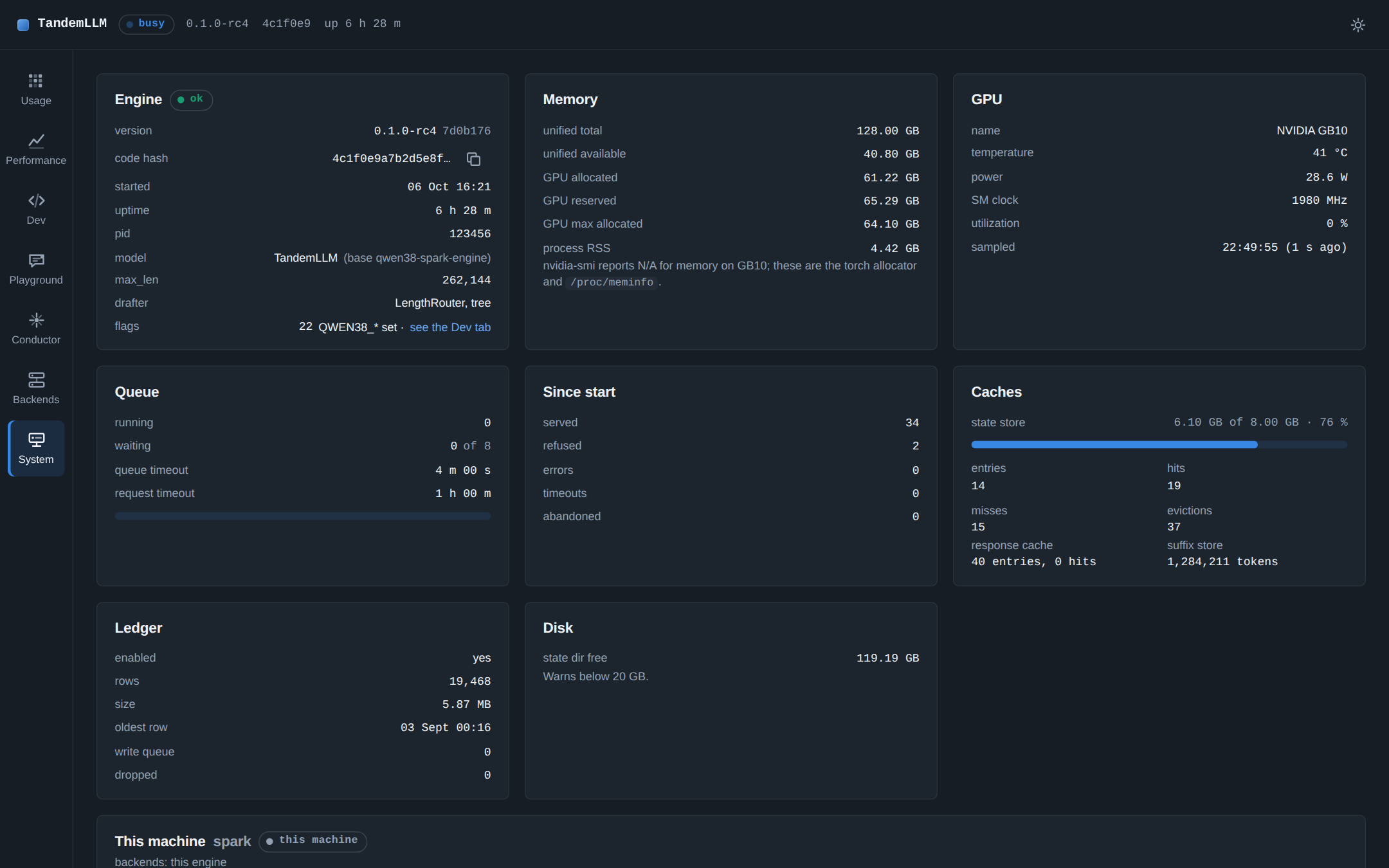
The engine’s settings (its command line and every QWEN38_* and QSE_* variable, the home directory written as ~, every token-like value redacted) and the machine’s state: memory, GPU, caches, with 30 minutes of history kept in the browser. The memory plan shows the engine’s own split (weights, KV pool, drafter caches, graphs, each read off the object that holds it), MemAvailable, every role with its claim and whether it fits now, the limits with what each holds, and the last refusal. Below them are the hosts: this machine with the engine’s process and every backend on it, and each remote backend’s machine, down to the GPU memory of its processes (Chapter 27).
The engine card carries one neutral line, the speed check: “passed for 0.4.0 · <date>” when the build has a speed guard report (the release ships its own, release/speed-guard.json), “not run for this build” otherwise; the numbers are in its tooltip and on the Conductor’s Compare screen. It is no warning: the speed guard is the release process’s check, not something to act on in the dashboard.
npm run preview:mock), not a measurement.25.9 The contract
docs/contract/dashboard-v1/ holds a JSON Schema for every JSON response of /v1/dashboard/* and a valid example of each; docs/contract/conductor-v1/ does the same for the conductor’s routes. Both sides test against them: the server’s tests validate real responses, and the dashboard’s tests validate the examples and every response of its mock server. A change to a field bumps contract_version, and the contract’s README lists every change.
25.10 Building and testing the page
cd dashboard
npm ci
npm run dev:mock        # the app against a mock engine
npm test                # unit, contract and build tests
npm run build           # type-check and build dist/
npx playwright test     # end-to-end, Chromium and WebKit, desktop and phone width
The mock engine plays scenarios for the Live panel (an agent turn with a chunked prefill and a tool call, a client that leaves during a prefill, one request per stop reason) and failure modes (an expired session, server errors, dropped streams). The end-to-end suites also run against server/app.py --fake-engine, which serves the real API with a scripted engine and no GPU. Every view works at a phone’s width of 390 pixels: the navigation becomes a bottom bar with short labels, and lanes and tables become cards.